
OzyProject · Built by us
Project management that shows who actually did the work
A board, a Gantt chart and risk registers, plus a record of each person's contribution kept as the work happens. Built for university group projects and the lecturers who oversee them, and just as useful for any team that gets asked who delivered what.
- Contribution evidence
- Week-based planning
- Lecturer portal
- LMS launch
The problem
Every group project ends with “who did what?”
Trello, Monday and Microsoft Project are good at showing a board. None of them is built to answer the question a lecturer, a client or a manager eventually asks.
- The board shows what's left to do, but not who did what's already done.
- Contribution gets argued from memory, chat threads and a shared drive at the end.
- Deadlines live as calendar dates while everyone actually thinks in “week 9”.
- A lecturer with forty teams finds out which ones are in trouble when the work arrives.
OzyProject records the evidence while the work happens, so the answer is already there when someone asks.
How it works
Use the board as normal. The record keeps itself.
Nobody writes a contribution report at the end. Finishing a task, logging time, attending a meeting or raising a risk is the evidence.
- Plan in weeks
- Work the board
- Evidence builds itself
- Staff see every team
-
Paced in weeks, not dates
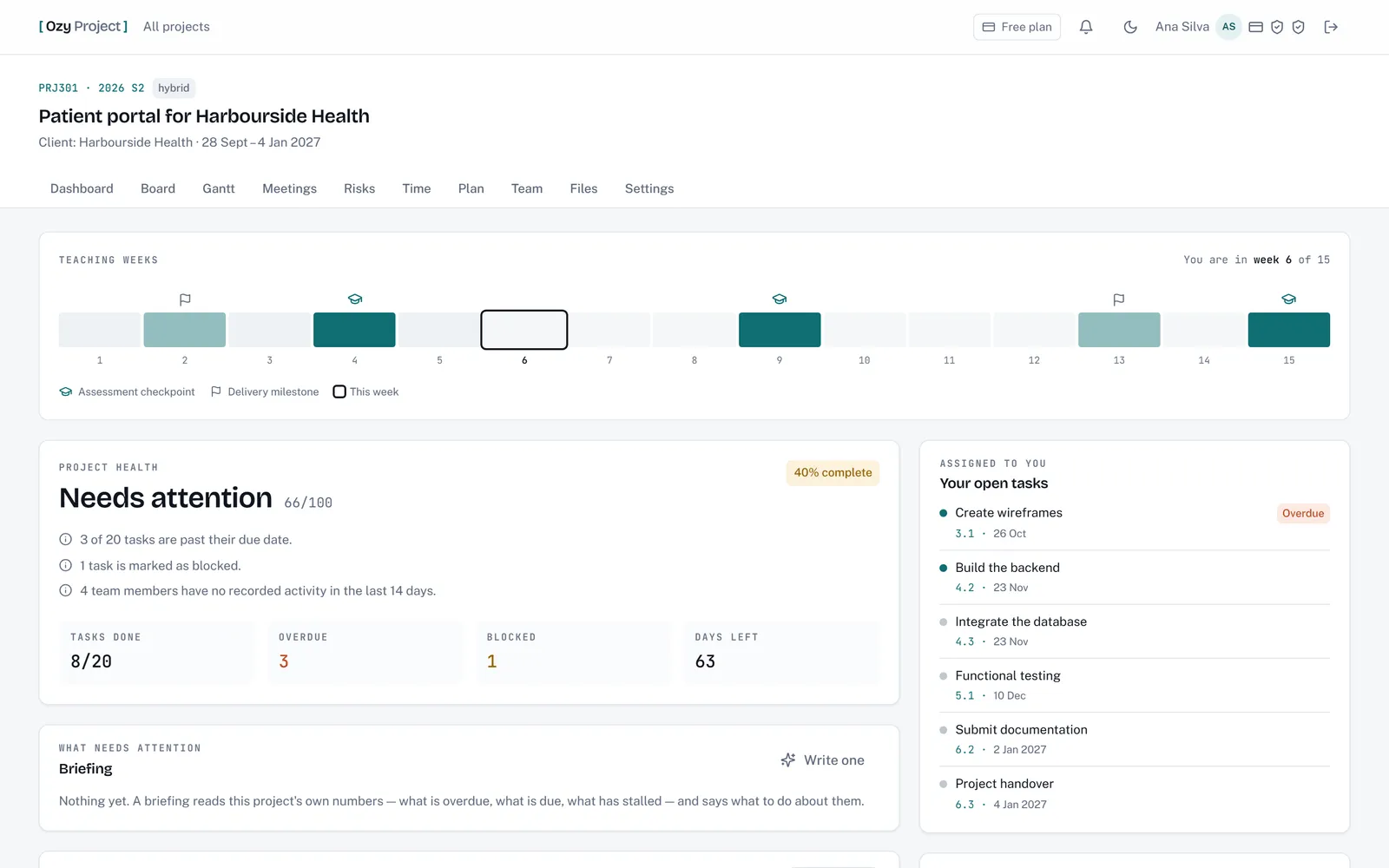
Milestones sit on numbered teaching weeks and the app always knows it's “week 6 of 15”. Deadlines, summaries and health all read against that calendar.
-
Evidence, not a score
The activity log is append-only. Reassigning a task later doesn't rewrite who finished it. The report counts facts and says on screen that it isn't a grade.
-
Tools that teach the method
A real critical-path calculation, a standard 5×5 risk matrix, and risks that close themselves when they become issues. It's how project management is taught, so the habits transfer.
The real product
Real screens, on invented data
Captures of the working app, not mock-ups. Every person, client, institution and unit code shown is made up.
Project dashboard
-
Board
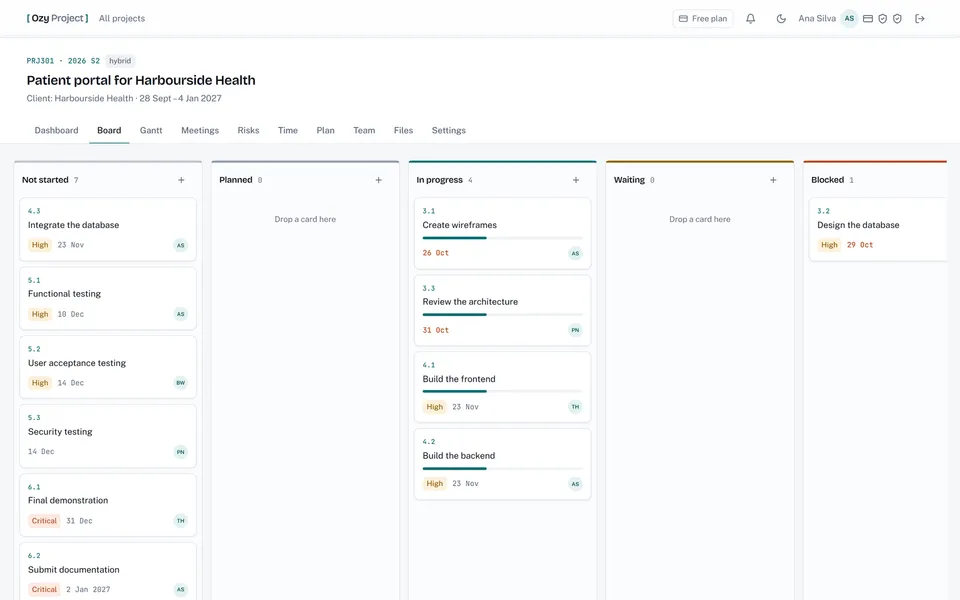
Drag-and-drop Kanban across eight status columns, with WBS codes, priorities and owners on every card.
-
Gantt & critical path
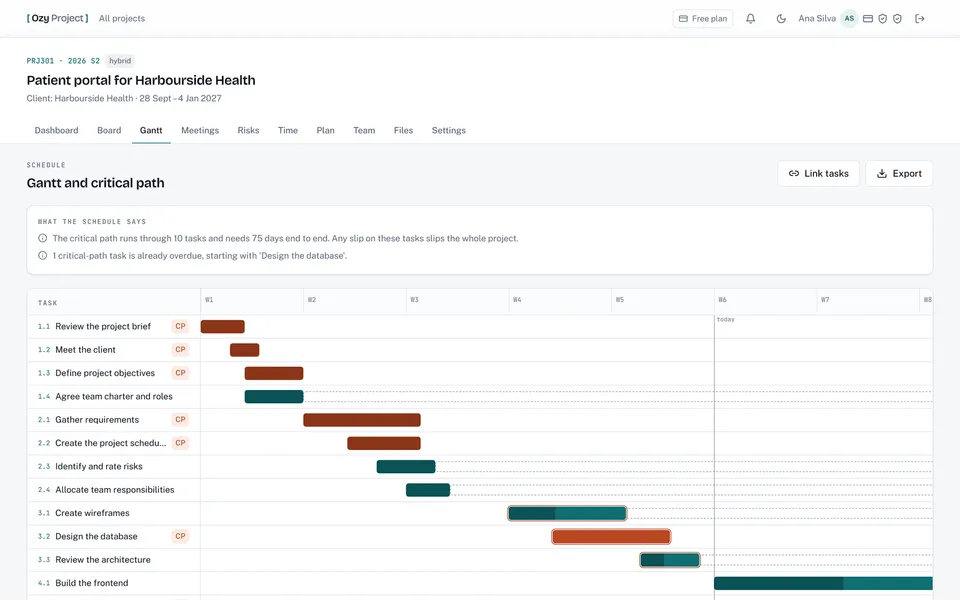
Dependencies with cycle detection, slack on every task, and a plain-English reading of what the schedule says.
-
Risks & issues
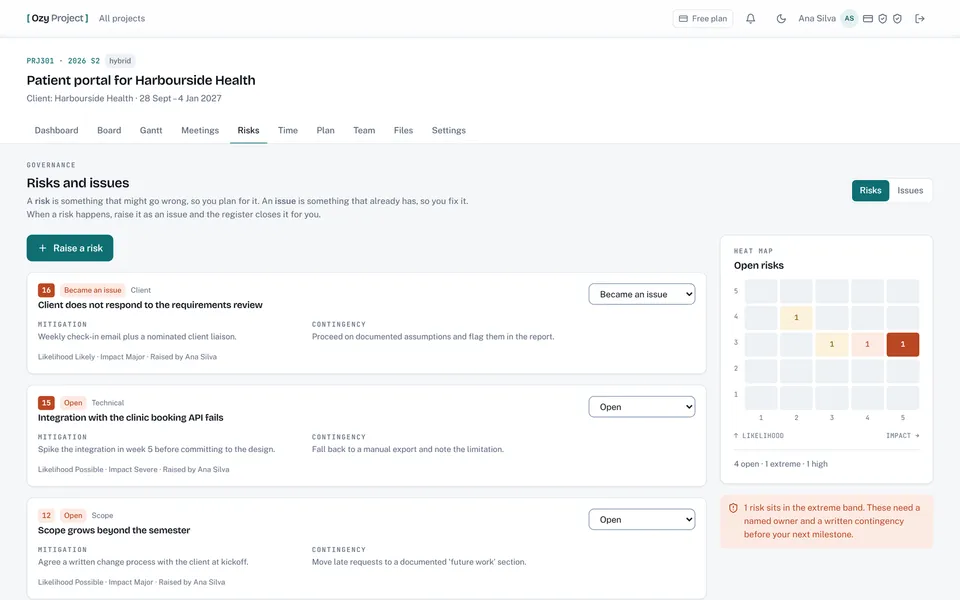
A risk register with a 5×5 heat map. Raise an issue from a risk and the register closes the risk for you.
-
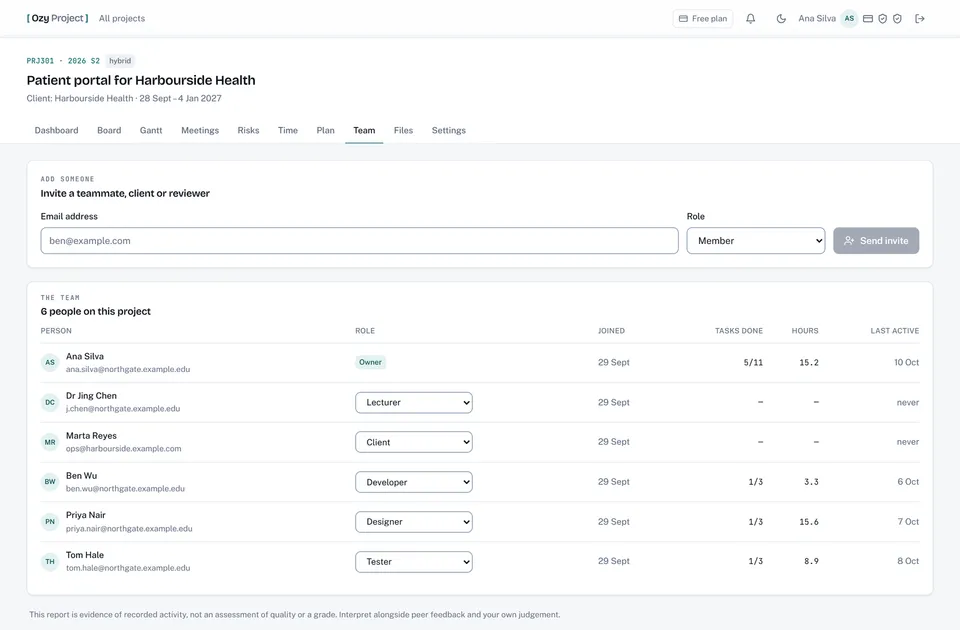
Contribution evidence
Tasks done, hours and last activity per person, plus anonymous peer evaluation — labelled as evidence, never as a grade.
-
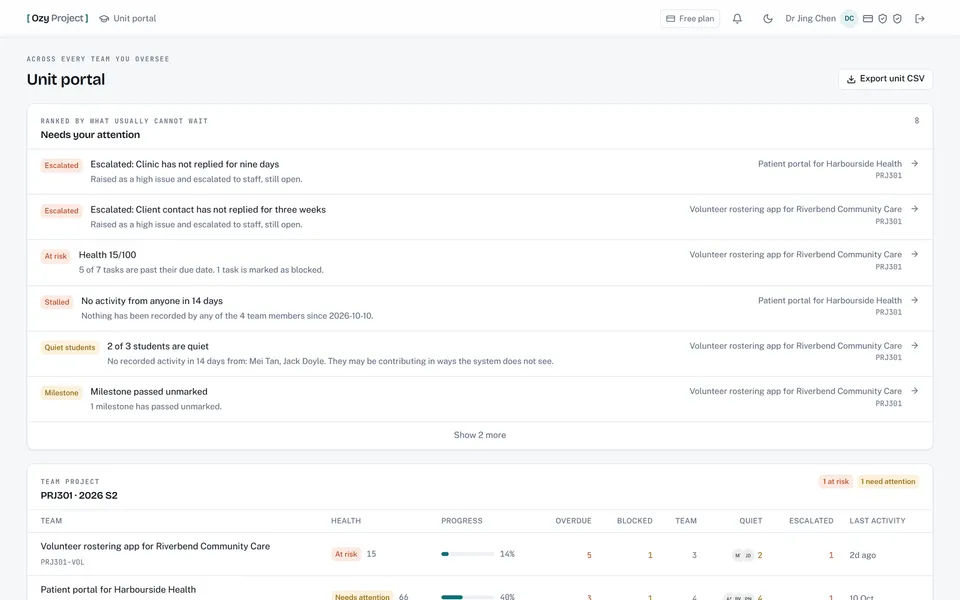
Lecturer unit portal
One screen across every team in a unit, ranked by what needs a response first: escalations, at-risk teams, quiet students.
What's inside
Everything a project team needs, in one place
- Kanban board Eight columns, WBS codes, estimates vs actuals
- Semester spine Milestones and checkpoints on teaching weeks
- Gantt & critical path Dependencies, slack, cycle detection
- Risk & issue registers 5×5 matrix, contingencies, escalation
- Meetings Agendas, attendance, decisions, minutes
- Time tracking Timers, manual entries, estimate vs actual
- Contribution evidence Per-person record, CSV for markers
- Peer evaluation Anonymous cycles with a staff-only view
- 15 project roles Students, staff and clients see their share
- Lecturer unit portal Every team in a unit, ranked by urgency
- Email & weekly summaries Invites, digests, a Monday summary
- AI plan drafting Reads a proposal and drafts the plan (add-on)
Who it's for
Built for the classroom, useful beyond it
-
Universities & course coordinators
Oversee every team in a unit from one screen, see who's quiet early, and moderate with a contribution record instead of competing recollections. It launches from Canvas, Moodle or Blackboard (LTI 1.3) and syncs the roster.
Ask about an institution licence → -
Student teams
Plan the project the way the unit is taught, keep the evidence as you go, and stop the “who did what?” argument before it starts. Free for students whose institution holds a licence.
-
Businesses & project teams
Any team that gets asked who delivered what: agencies, consultancies, internal project groups. Clients get their own view of the deliverables, and nothing they shouldn't see.
Register for early access →
Plans
Start free. Pay when it's earning its keep.
Pricing isn't published yet — ask and we'll quote for your team or cohort.
-
Free
Get the whole team on the board
- One live project at a time
- Unlimited people
- Every core feature
-
Pro
Per seat, for teams that run several projects
- Unlimited live projects
- Repository integration
- Everything in Free
-
Institution licence
For a university, school or training provider
- Pro for everyone on your email domain
- Free for your students
- AI drafting can be included
Every plan includes the board, Gantt and critical path, risk and issue registers, meetings, time tracking, contribution evidence and peer evaluation.
AI plan drafting is an optional add-on to Pro, billed once per workspace, because it costs real money each time it runs. An institution licence can include it.
Built properly
Safe to trust with a whole cohort
-
Permissions on the server
Each role's view is enforced by the API, not just hidden in the interface.
-
Two-factor sign-in
Authenticator-app codes with recovery codes. Not SMS, which is SIM-swappable.
-
No card details held
Payments run on Stripe's hosted pages. Card numbers never reach the app.
-
Your data is yours
Anyone can export their own data, on every plan. Daily backups of the database and files.
Built with Python (FastAPI), PostgreSQL, React and TypeScript, and runs in Docker.
Questions
The honest answers
Can I use OzyProject now?
It's a working product, but it isn't open for public sign-up yet. Request a demo and we'll walk you through it, or register for early access and we'll be in touch when places open.
How much does it cost?
There's a free plan for one live project with unlimited people. Pro is billed per seat, the AI plan-drafting add-on is billed per workspace, and institutions can licence it for everyone on their email domain. Pricing isn't published yet, so ask and we'll quote for your team or cohort.
Does it grade students?
No, deliberately. It records evidence of activity — tasks, hours, meetings, comments — and says on screen that this isn't an assessment of quality. When a team reaches an assessment checkpoint it can tell the LMS gradebook that the work is submitted, but it never sends a score.
Does it work with our LMS?
It supports LTI 1.3 launch from Canvas, Moodle and Blackboard, so students open it from the course without a second password, and staff can pull the course roster. Setting that up needs your institution's LMS administrator, and we'd work through it together.
Is the AI included?
No. AI plan drafting reads a project proposal and drafts the plan, but it costs real money per use, so it's an optional add-on. Everything else works without it, including importing a plan from a document's own tables.
Who built it?
We did. OzyProject is a Do It Better I.T. product, designed and built in-house, not client work. If you need a system like it for your own organisation, that's something we build too.
See it in action
Running team projects? Let's show you.
A short walkthrough with your own scenario: a unit, a cohort or a client project. If you need something like it built for your organisation, we do that too.
